
The Challenge
Background:
A half-century ago, NASA conducted the Apollo missions, which put the first men on the Moon. Artemis (the name of Apollo's twin sister) is NASA's planned lunar mission to put the first woman and the next man on the Moon. Through a variety of upcoming robotic and human activities on the surface and in orbit around the Moon, we will better understand the universe and our home planet. Then, we will use what we learn on and around the Moon to take the next giant leap – sending astronauts to Mars.
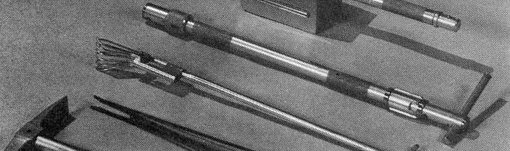
Your challenge is to create interactive 3D models of equipment that future space explorers can use for activities such as exploring a lunar or planetary surface, and deploy them on a web page. Think about what kinds of experiments future explorers will want to perform, and what sort of tools could help with those experiments. For example, you could (but are not required to) design planetary geology tools for exploring bodies such as moons, planets, and asteroids. As one historical example, the Apollo 16 Press Kit (see Example Resources) has pictures of the tools that the Apollo 16 astronauts carried in their geology field kit.
Potential Considerations:
- Products from this challenge ought to be relatively low polygon count models in the Graphics Language Transmission Format (GLTF). The model(s) should be embedded in a deployed web page. If a team uses an existing asset, then the web page must provide credit to the original model creator. Ideas for potential models that could be manipulated via HTML5 widgets or 3D widgets within the WebGL model include:
- One or more robot hands with two or more fingers with actions to open, close, move (x,y,z), and rotate (pitch, yaw, roll)
- A teleoperated robotic glove box or greenhouse that includes commands to pick up, move, place, push, pull, etc.
- A subsystem, e.g. battery, capacitor, bearings, or turbofan, with a plot of prognostic data from the Prognostics Data Repository
- Virtual equipment that presents time-series Goddard Institute for Space Studies (GISS) Earth science data sets
- Interactive 3D models of Lunar Geology Hand Tools as described and depicted in pages 79-85 of the Apollo 16 Press Kit
- Participating teams should research planetary exploration tools, create interactive 3D models of the equipment, embed those models in a web page, and deploy the web page on a free hosting service. Keywords for researching development applications and hosting services are as follows:
- Regarding the 3D model format, key words include GLTF, COLLADA, and WebGL.
- To find an application to create the 3D models, try the key words free open source 3D modeling.
- To embed a 3D model, search for tutorials that explain how to add GLTF models to a web page.
- To learn how to deploy a web page, search for free web hosting services. Consider where you are deploying your code repository; repository hosting services also offer web page hosting.
- Beginners may create individual tools or devices, such as a pick or a hammer. Intermediate teams may produce a kit containing multiple tools or devices; the kit itself may be a backpack or an interactive container. Advanced teams could create interactive models of analysis equipment that present real or simulated time-series data. The model could be a historic or futuristic design of equipment such as hand tools, analysis equipment, or integrated kits comprised of several items. Consider making the model interactive, such as a hinged lid, button(s), knob(s), switch(es), slider(s), etc. Or, teams may identify multiple time-series data sets that could be presented as a static or dynamic 3D visualization in WebGL with widgets that enable starting, stopping, and zooming to manipulate the model.
- For security reasons, Space Apps judges cannot download executable files, so the 3D models must be embedded in a deployed web page.
- Suggested web search terms include:
- Free open source 3D modeling tools
- Free web hosting service, e.g. GitHub pages
- Free JavaScript code library for WebGL, e.g. "A-Frame", "BabylonJS", "ThreeJS"
- Convert COLLADA to GLTF
- How to embed WebGL in a web page
For data and resources related to this challenge, refer to the Resources tab at the top of the page.
NASA does not endorse any non-U.S. Government entity and is not responsible for information contained on non-U.S. Government websites.